---
title: How to add new Teams channel?
description: info on how to add new teams channel
---
[Skip to content](https://info.transitionaccelerator.ca/allabouttools/how-to-add-new-teams-channel#main-content)
English
Show submenu for translations

- [About](https://info.transitionaccelerator.ca/allabouttools/how-to-add-new-teams-channel#about)
Open main navigation
Close main navigation
- [About](https://info.transitionaccelerator.ca/allabouttools/how-to-add-new-teams-channel#about)
- English
Show submenu for translations
- Contact us
Contact us
How can we help you?
- There are no suggestions because the search field is empty.
1. [All About Internal Tools](https://info.transitionaccelerator.ca/allabouttools?hsLang=en)
2. [General](https://info.transitionaccelerator.ca/allabouttools/general?hsLang=en)
3. [Teams](https://info.transitionaccelerator.ca/allabouttools/general?hsLang=en#teams)
March 16, 2026
# How to add new Teams channel?
## This guide outlines the steps to locate and access the new team's channel within the platform.
**1. Locate the Teams and Channels Panel**
- Open the platform and look at the left-hand side panel.
- Find the section labeled 'Teams and Channels'.
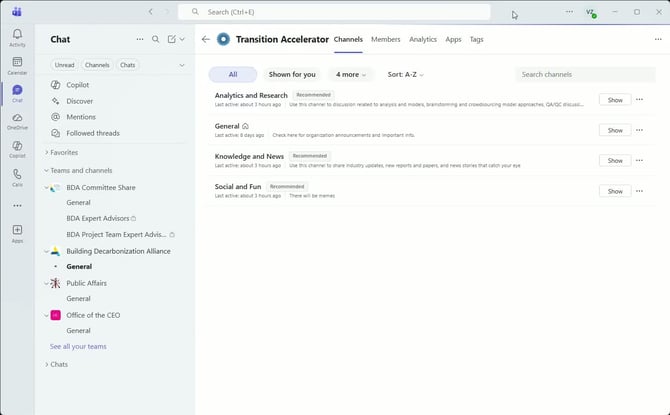
**2. Find the Transition Accelerator Team**
- Under the 'Teams and Channels' section, locate your teams.
- Look for the team named 'Transition Accelerator'.
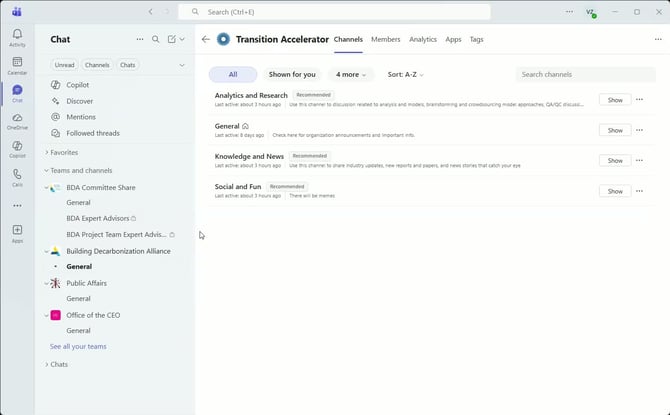
**3. Access the New Channels**
- Click on 'Transition Accelerator' to enter the team.
- You will see four new channels:
- - - Analytics and Research
- General
- Knowledge and Use
- Social and Fun
**4. Expand Channels if Not Visible**
- If the channels do not appear, click on 'Show'.
- Expand the view to see all available channels.
If you still have any questions or need assistance, feel free to reach out.
### Cautionary Notes
- Ensure you are logged into the correct account to access the 'Transition Accelerator' team.
- If channels are still not visible after expanding, check with your team lead for access permissions.
### Tips for Efficiency
- Familiarize yourself with the layout of the platform to navigate quickly.
- Bookmark the 'Transition Accelerator' team for easy access in the future.
### Link to Loom
[https://loom.com/share/2d81f9325fdf447992c5617e1143b966](https://loom.com/share/2d81f9325fdf447992c5617e1143b966)
- [General](https://info.transitionaccelerator.ca/allabouttools/general?hsLang=en#main-content)
- [Teams](https://info.transitionaccelerator.ca/allabouttools/general?hsLang=en#teams)
- [CRM Troubleshooting](https://info.transitionaccelerator.ca/allabouttools/crm-troubleshooting?hsLang=en#main-content)
- [Hubspot](https://info.transitionaccelerator.ca/allabouttools/crm-troubleshooting?hsLang=en#hubspot)
- [Operations and Core Work Tools](https://info.transitionaccelerator.ca/allabouttools/operations-and-core-work-tools?hsLang=en#main-content)
- [Forecast/Harvest](https://info.transitionaccelerator.ca/allabouttools/operations-and-core-work-tools?hsLang=en#forecast-harvest)
- [Sharepoint and File Organization](https://info.transitionaccelerator.ca/allabouttools/operations-and-core-work-tools?hsLang=en#sharepoint-and-file-organization)
- [Productivity Tools Guidelines](https://info.transitionaccelerator.ca/allabouttools/productivity-tools-guidelines?hsLang=en#main-content)
- [Think-cell](https://info.transitionaccelerator.ca/allabouttools/productivity-tools-guidelines?hsLang=en#think-cell)
- [Efficient Elements](https://info.transitionaccelerator.ca/allabouttools/productivity-tools-guidelines?hsLang=en#efficient-elements)
- [AI Tools](https://info.transitionaccelerator.ca/allabouttools/ai-tools?hsLang=en#main-content)
- [Claude](https://info.transitionaccelerator.ca/allabouttools/ai-tools?hsLang=en#claude)
- [About](https://info.transitionaccelerator.ca/allabouttools/how-to-add-new-teams-channel#about)
[](http://www.transitionaccelerator.ca)
[mailto:email@email.com](mailto:email@email.com)
Copyright © 2026, The Transition Accelerator